How To Change The Water Filter On A Kenmore Refrigerator: Easy 2026 Guide
Changing the water filter on a Kenmore refrigerator is a simple task that takes just a few minutes and requires no special tools. With the right filter model and a quick twist or push, you can have fresh, clean water flowing again in no time.
If you’ve been putting off this small but mighty home maintenance task, you’re not alone. Most people don’t think about their refrigerator water filter until the water starts tasting a little off or the ice cubes look cloudy. The truth is, knowing how to change the water filter on a Kenmore refrigerator is one of the easiest ways to keep your drinking water safe, your ice crystal clear, and your appliance running smoothly. Over the years, I’ve helped friends, family members, and even a few neighbors swap out their old filters, and every single time they’re surprised at how quick and painless it really is. In this guide, I’ll walk you through every step, share a few insider tips, and answer the most common questions so you can do it with total confidence.

Why Changing Your Kenmore Refrigerator Water Filter Matters
Your refrigerator water filter does a lot more than you might think. It’s the silent guardian of every glass of water you pour, every cube of ice that drops into your drink, and every steamed vegetable you cook with fridge water. Over time, that filter collects sediment, chlorine, lead, and other contaminants. Once it’s clogged or saturated, it can’t do its job properly. That’s when you start noticing funny tastes, odors, or even reduced water flow.
Most Kenmore refrigerator models recommend changing the water filter every six months, or sooner if you notice changes in taste or water pressure. Some newer models even have a filter indicator light that tells you when it’s due. Ignoring that little light can lead to bacterial buildup, poor-tasting water, and even strain on your refrigerator’s water system.
Think of it like changing the oil in your car. You wouldn’t drive 10,000 miles past your oil change window and expect the engine to run perfectly. The same logic applies here. A fresh filter keeps your fridge efficient and your water clean.

How Often Should You Replace a Kenmore Refrigerator Water Filter
The general rule of thumb is every six months, but that depends on how much water you use. If you have a large family or you’re constantly filling up water bottles, you might need to replace it every four months. On the flip side, if you live alone and don’t use the water dispenser much, you might stretch it to eight months.
Here are a few signs it’s time for a new filter:
- The filter light on the display turns on
- Water tastes or smells unusual
- Ice looks hazy or has particles
- Water flow from the dispenser slows down
- It’s been more than six months since the last change
A good habit is to mark your calendar or set a phone reminder every six months. I personally do it when the clocks change for daylight saving time. It’s an easy memory trick that keeps me on schedule.

What You’ll Need Before You Start
Before you start the actual swap, gather a few things. This will save you from walking back and forth to the kitchen mid-project.
- A new Kenmore refrigerator water filter (the correct model for your fridge)
- A clean towel or rag
- A small bucket or bowl (optional but helpful)
- About five to ten minutes of your time
That’s it. No screwdrivers, no wrenches, no plumber’s tape. Just you, the filter, and a little patience.

Finding the Correct Replacement Filter for Your Kenmore Refrigerator
This is the step most people get wrong. Not every filter fits every Kenmore refrigerator. Kenmore is a brand sold primarily at Sears and Kmart, and they use different filter models depending on the refrigerator line.
The most common Kenmore water filter models are:
- Kenmore 46-9930
- Kenmore 46-9915
- Kenmore 46-9690
- Kenmore 46-9083
To find the right one, check your refrigerator’s owner’s manual, look at the existing filter for a part number, or check the model number of your fridge. The model number is usually found on a sticker inside the fridge on the left wall or near the crisper drawers.
Pro tip: If you’re unsure, take a picture of your old filter and bring it to the appliance parts store or search online using the model number. Buying the wrong filter is a common mistake that leads to frustration and wasted money.

Where Is the Water Filter Located on a Kenmore Refrigerator
Depending on your Kenmore model, the water filter can be in one of three places:
- Inside the refrigerator, in the upper right corner near the temperature controls
- Inside the refrigerator, on the left wall near the bottom
- In the grille at the bottom front of the refrigerator, behind the kick plate
Most side-by-side and French door models have the filter inside the fridge. Top-freezer models usually have it in the bottom grille. Once you locate it, you’re ready to make the swap.

Step-by-Step Guide: How to Change the Water Filter on a Kenmore Refrigerator
Now for the main event. I’ll break this down by filter location so you can follow the exact steps for your model.
Changing a Kenmore Filter Located Inside the Refrigerator
- Turn off the ice maker. This prevents the ice maker from trying to make ice with no filter in place.
- Locate the filter. It’s usually in the upper right corner or on the left side near the bottom.
- Twist the old filter. Most Kenmore filters either twist a quarter turn or pull straight out. If it has a small handle, turn it counterclockwise until it releases.
- Pull the filter straight out. You might see a little water drip, so have your towel ready.
- Remove the protective cap from the new filter. Some filters come with a plastic cap covering the openings.
- Insert the new filter. Line it up with the opening and push it in until it clicks or locks into place. For twist-style filters, insert it and turn clockwise until it stops.
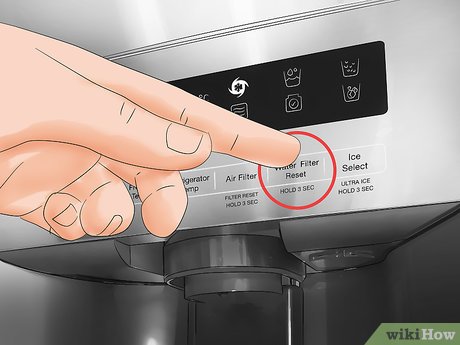
- Reset the filter indicator light. Press and hold the “Filter Reset” button on your control panel for about three seconds. The light should turn off.
- Run two to four gallons of water through the dispenser. This clears out any air and carbon dust from the new filter.
Changing a Kenmore Filter Located in the Bottom Grille
- Open the bottom grille or kick plate. It usually pops off with a little pressure or has small tabs on the sides.
- Twist the old filter counterclockwise until it releases.
- Pull it out gently. Water may drip, so place your bowl underneath.
- Slide the new filter into the housing.
- Twist it clockwise until it locks.
- Replace the grille.
- Run water through the dispenser for a few minutes to flush the system.
- Reset the filter indicator if your model has one.

Resetting the Filter Indicator Light
After installing the new filter, you need to reset the indicator light. If you skip this step, the light will keep nagging you even with a brand-new filter.
Here’s how to reset it on most Kenmore models:
- Press and hold the “Filter” button on the control panel for three to five seconds.
- The light should change from red to green or turn off completely.
If your model doesn’t have a display, the reset might happen automatically once the filter is changed. Check your owner’s manual if you’re unsure.

Common Mistakes to Avoid When Changing Your Kenmore Water Filter
Over the years, I’ve seen a few mistakes pop up repeatedly. Here’s what to watch out for:
- Forgetting to flush the new filter. If you skip this step, your first few glasses of water may have black specks (carbon dust) or taste funny.
- Using the wrong replacement filter. Always double-check the part number before installing.
- Not turning off the ice maker. If you leave it on, it can try to cycle with no filter and cause errors or leaks.
- Overtightening the filter. These are plastic components. Snug is enough. Cranking it too hard can crack the housing.
- Ignoring the reset button. The filter light will keep annoying you until you reset it.

Tips to Make the Process Even Easier
After changing hundreds of filters at this point, I’ve picked up a few tricks that make life easier:
- Keep a spare filter on hand. The moment you change the filter, order a new one so you always have a backup.
- Write the install date on the new filter with a marker. It helps you remember when you changed it.
- Flush the filter over a sink or bucket. Some folks do it with a pitcher. I prefer to run it directly into the sink drain.
- If you have hard water, change the filter more often. Mineral buildup can clog filters faster.
- Consider a filter subscription. Many services auto-ship replacements every six months, so you never forget.
Benefits of Regularly Replacing Your Kenmore Refrigerator Water Filter
Staying on top of filter changes isn’t just about taste. It comes with real benefits:
- Better-tasting water and ice
- Reduced contaminants like chlorine, lead, and mercury
- Improved water flow from the dispenser
- Longer life for your refrigerator’s water system
- Fewer service calls and repair bills
Think of it as a small investment in your health and your appliance’s longevity. A twenty-dollar filter twice a year is way cheaper than a plumber’s visit or a new refrigerator.
Frequently Asked Questions About Changing a Kenmore Refrigerator Water Filter
How do I know which Kenmore water filter I need?
Check your refrigerator’s model number, usually found on a sticker inside the fridge. Then match it to the correct filter part number. The most common models are 46-9930, 46-9915, and 46-9690.
Can I use a generic water filter in my Kenmore refrigerator?
Yes, many third-party filters fit Kenmore refrigerators and are more affordable. Just make sure it’s certified by NSF or another reputable testing agency to ensure it meets safety standards.
Do I need to turn off the water before changing the filter?
In most cases, no. The filter housing has a built-in shut-off valve. Just have a bag ready to catch any drips and you’re good to go.
How long does it take to change a Kenmore refrigerator water filter?
The actual swap takes less than five minutes. Add another five to minutes to flush the system, and you’re done in about 10 minutes total.
What happens if I don’t change my refrigerator water filter?
The filter will clog, reducing water flow. Your water may taste bad, and contaminants can pass through. Over time, sediment can damage your refrigerator’s water valve and lines, leading to costly repairs.
Final Thoughts
Changing the water filter on a Kenmore refrigerator is one of those small home maintenance tasks that pays off in a big way. It takes less than ten minutes, costs around twenty bucks, and gives you peace of water every time you fill a glass. Once you do it the first time, you’ll wonder why you waited so long. So grab that filter, set a reminder for six months from now, and enjoy the freshest water and ice your Kenmore can deliver. If you found this guide helpful, drop a comment below with your own tips or questions. And if you know someone who’s been putting off this task, share this article with them. You might just save them from a future plumbing headache.